Android · A bedside clock for toddlers · Made in the UK
A clock a three-year-old can read in the dark.
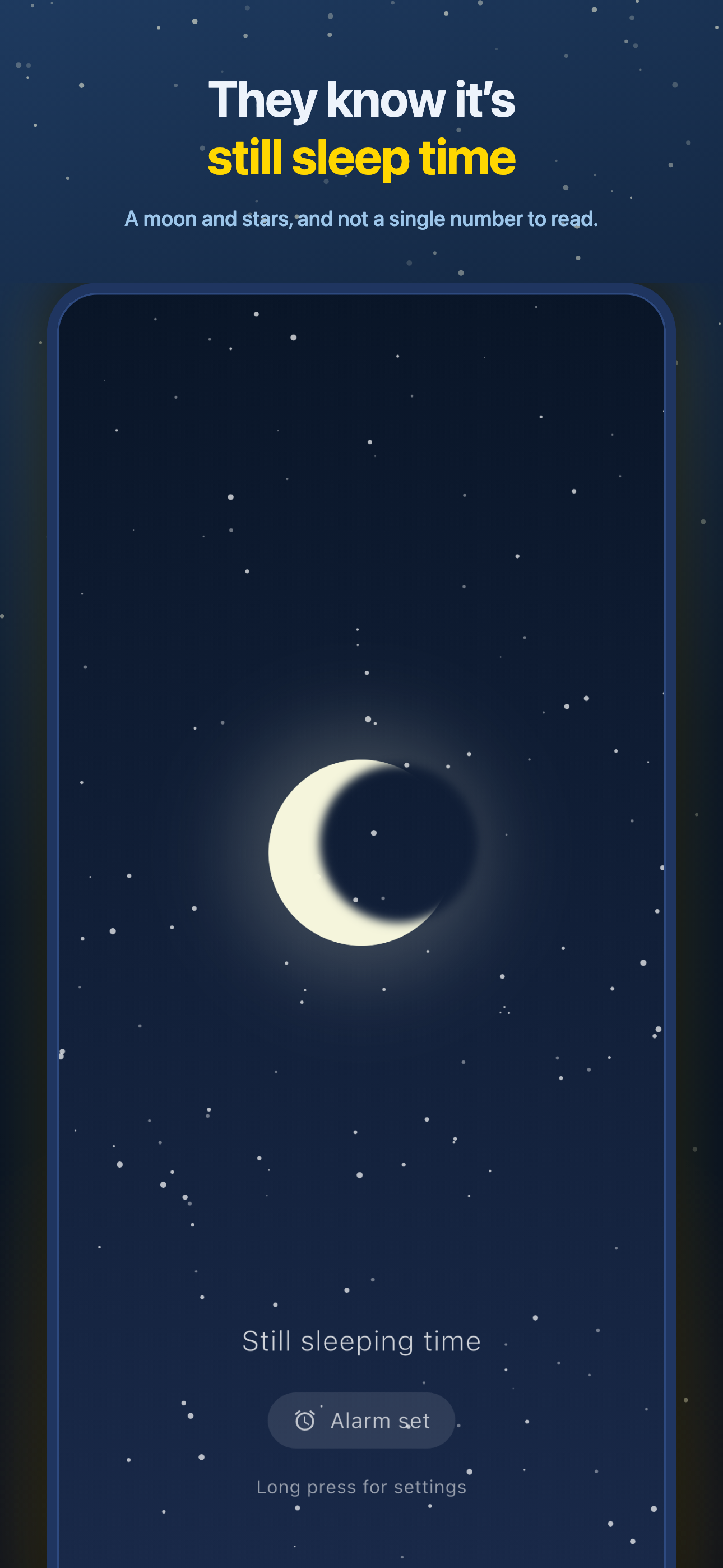
Sleepy Clock takes the time off the screen and puts a sky there instead. A moon and stars from bedtime, then a sun as the morning you chose arrives — and a caption underneath that changes from “Still sleeping time” to “OK to get up”. Nothing to read, nothing to tap, no digits anywhere.
Free to tryNo ads. No account.One payment for ProMade in the UK
🌙 Still sleeping time✨ Stars🔵 Dawn🟡 Early morning🟠 OK to get up⏰ Wake window🛏️ Bedside mode📅 Weekday / weekend🎨 Phase colours🔇 No ads🌙 Still sleeping time✨ Stars🔵 Dawn🟡 Early morning🟠 OK to get up⏰ Wake window🛏️ Bedside mode📅 Weekday / weekend🎨 Phase colours🔇 No ads
How it works
Set the hours once. Then just stand it on the nightstand.
Two minutes of setup while they are in the bath. After that the sky changes on its own, every night, without anyone touching the phone.
01
Set your four phases
Night, Dawn, Early Morning and Morning — you decide when each one begins. A house that starts at 6:30 and one that starts at 7:15 get the same sun-and-moon clock, set to their own hours. All four boundaries are in the free version.
02
Give the alarm a window
Not a minute — a window, say 6:45 to 7:05. Sleepy Clock rings at a moment drawn at random inside it, so nobody in the house learns exactly when the sun is due. It snoozes, it dismisses, and it shows over the lock screen.
03
Stand it by the bed
Bedside mode keeps the screen awake and drops it to about five per cent brightness, with the status bar out of the way. Readable across a dark room, and not bright enough to be a lamp.
Why it works
A moon, a sun, and nothing else to learn.
A sky, not a time
Four phases, each with a plain-language caption. There are no digits, hands or clock faces anywhere on the clock screen — hiding the time is the product.
Your hours, not ours
Every phase boundary is yours to set, and the app checks the order so a morning can never start before its dawn. Free, all four.
Wake-window alarms
Give the alarm a window instead of a minute and it rings somewhere inside it. Snooze and dismiss behave exactly like a normal alarm clock.
Bedside mode
Screen kept awake, brightness dropped to about five per cent, full-screen and quiet. Built for a dark bedroom at three in the morning.
Still armed after a restart
Every enabled alarm is queued seven occurrences ahead, so it keeps ringing for a week even if the phone reboots overnight. The queue rolls forward each time the app is opened.
Pro: schedules and colours
Unlimited alarms, separate weekday and weekend schedules, and ten colour swatches for each phase. One payment, no subscription.
Inside the app
Everything it does:
Four skies, an alarm with a window instead of a minute, and a bedside mode. That is the whole product — there is nothing else to find.
🌙
Night
“Still sleeping time”
🔵
Dawn
“Almost morning”
🟡
Early Morning
“Nearly time to get up”
🟠
Morning
“OK to get up”
⏰
Wake window
Rings inside 6:45–7:05
📅
School morning
Mon–Fri schedule · Pro
🎨
Phase colours
Ten swatches each · Pro
🛏️
Bedside mode
Screen awake, 5% bright
Pricing
Free to try. Pro when you're ready.
Free to download, and the free version is the whole clock — not a demo, and the clock is never taken away. Pro is one payment. No subscription, nothing to cancel.
Prices shown in GBP. Pro is a single one-time purchase billed by Google or Apple — no subscription.
Why a sky
The time is the problem. So we took it off the screen.
A child who cannot read a clock cannot be told to wait until 7:00. And an adult who wakes at 3am and sees “03:47” has just started doing arithmetic about how much of the night is left.
Sleepy Clock answers the only question either of them has — is it time yet — with a shape and a colour, from across a dark room, in about a second. There are no characters, no rewards and no coins to collect, and no promise about anybody’s sleep: it shows a sky at the hours a parent chose, and it rings an alarm. For a lot of tired households, not being sold sleep training is the feature.
0
Digits on the clock screen. No numbers, no hands, no clock face — that is the whole idea.
4
Sky phases, and you set when each one begins. All four are in the free version.
£2.99
One payment for Pro. No subscription, no ads, nothing to cancel.
FAQ
The basics.
Will my child actually understand it?
That is exactly what the free version is for. The clock itself — all four phases, every boundary you can set, and one working alarm — is free, so you can find out before you spend anything. Only extra alarms, weekday/weekend schedules and colours sit behind the payment.
Does it show the time anywhere?
Not on the clock screen. You see times in Settings, where you set the phase boundaries and the alarm windows, and that is the only place. In bedside mode the phone’s own status bar is hidden too.
Why does the alarm ring at a random time?
You give it a window rather than a minute. Because the exact minute is never the same twice, nobody learns precisely when the sun is due, so the sky stays a signal rather than a countdown. Snooze and dismiss work as they do on any alarm.
Does the phone have to stay on all night?
It is a bedside clock, so it is meant to sit plugged in on the nightstand with the app open — bedside mode keeps the screen awake at about five per cent brightness. The alarm itself is a scheduled system alarm, queued a week ahead, so it still rings if the app is closed or the phone restarts in the night.
Is Pro a subscription?
No. Sleepy Clock Pro is a one-time purchase of £2.99. Restore purchase sits in the app on every launch, so the unlock follows the store account that bought it — including on a new phone.
Are there ads, or an account to make?
No ads and no sign-up anywhere in the app. Your alarms, phase times and colours are kept on the phone. The one thing the app talks to is the store, to check whether Pro has been unlocked and to complete a purchase.
Will it help my child sleep better?
We will not claim that. Sleepy Clock shows a sky at times you chose and rings an alarm — no sleep-training promises, no behavioural claims, no reward economy. What it does is give a child who cannot read a clock a way to answer “is it morning yet” without getting up to ask.
Is there an iPhone version?
Sleepy Clock is on Google Play for Android now. The iPhone build is finished and has been submitted to Apple; this page will link to it once it is live.
Give them a sky.
Free on Google Play. The whole clock, four phases and a working alarm, with no ads and no account. Pro is one payment of £2.99 when you want more.